Showing posts with label shoes. Show all posts

8.5.10

Emotional Dusk Lighting

Ok, I just want to share with you guys some small tips to create a very emotional 'dusk lighting' as I used in the shoot with Elizabeth Payne (View post here)

The point is, you should choose to use the ambient light very carefully and to do this, you need to get some lucks then, because not everyday could be a beautiful sunny day. So the first thing to do, you should do the shoot around 3:30pm to 5pm and it depends on the weather (it's Fall in Australia now so the sun come down very fast, different with summer, we still have sun light at 8pm).
The second thing is, adjust your White Balance setting into 5500K. If you use Auto White Balance to shoot when sunset, your camera will automatically adjust the color temperature into lower than 5000K to make your photo look 'cooler' against the 'warm' color temperature of the environment.

Then, use Color Balance in your Photoshop to adjust the color a bit (Image -> Adjustments -> Color Balance) with some setting like this:
You can see that it just slightly shift the color tone a bit to more yellow and red because I don't want to blend the color a lot and I still want to keep the color of the clothes as well.
Then use the final trick to make to photo look warmer: Photo Filter (Image -> Adjustments -> Photo Filter)

You can also want to use Hue / Saturation to give more saturation on Yellow and Red, but it depends on the photo you want to edit.


And that's it, now we can see the result:

Elizabeth Payne - Model shoot

This is a wonderful shoot with the gorgeous model: Elizabeth Payne. This time we had a Ferrari 512TR as props and to have a super car as props like that is so cool. Mark, the Ferrari's owner, also contributed himself as a model in some shots as well.
The first location is by the lake side near Old Parliament House of Canberra, there was a passage lead to the lake, surround by wooden walls. We parked the Ferrari on that passage to have some first shots with Elizabeth bikini:
Main light was a naked 580EX high above model to simulate sun light, 2 other small flashes around the car to create some more rim lights.

Main light bounced into the wall to create soft light on her, two other flashes was put low on the ground.


Then we move to the airport and parked on the upperfloor of a car park. This open space is perfect to have some shots with the sunlight and blue sky. Most of the time I used only ambient light.

The car made a very nice background for a high fashion shoot.
This shot I use the rear car hood as a 'gobo' to let the sun went through. I love Elizabeth's look in this shot.


And that's it. Maybe you want to watch behind the scene video as well:
 

Credit:
Model: Elizabeth Payne and Mark McEwen
Make-up by Kylie Bersinic
Hair by Priya Chandra
Skirt and dress by Beau & Arrow
Bikini and suits by model's own
Video recorded by Sammy Harrison, edited by me.

Some behind the scene photos taken by Sam, Elizabeth's boyfriend:

17.4.10

Allura Maison - Model shoot

A shoot I had on this Wednesday, with Allura, a very talented and beautiful model. This time we got Beau & Arrow label for wardrobe and I love their dresses, very cute, feminine and sexy.

We had some shoot at Dendy car park first, I love how natural light falls off on the model.

Then we moved to Braddon to shoot in an alley created by 2 building. I tried to make my flash falls on Allura as sun light so I use bare flash, power at 1/2, 6 meters far from her and open wide at 24m. I think it worked.
Crop from the photo above.

Finally we move to a corner in front of Uni Lodge, this time I use the cars' headlights as backlight.
 And another shot in BW
Model: Allura Maison
MUA: Kylie
Hair: Priya
Dresses: Beau & Arrow


Bonus:
• For the shot at the alley, there was a car in the photo, I need to removed it by Photoshop just because it was there like an hour and didn't move anywhere else. You can also notice that I 'enhance' Allura hair a bit to make her hair look more glamourous.

Look at the crop image again to see if you can tell that some more parts of her hair were drawn by Photoshop. 

• Backstage vid captured by my iPhone. I'm thinking to ask someone help me to film backstage vid next time. 

Clint Domine - Model Shoot

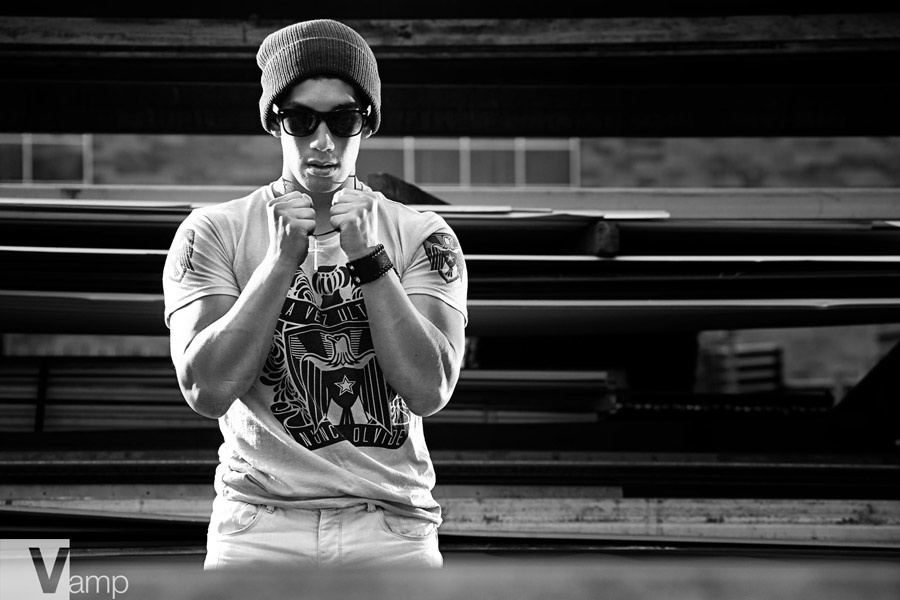
I had a shoot with Clint last week. He was a very good model and his figure looks so cool on the photos. Plus he was mixed from Vietnamese & French so he has a very orientation look. We drove to Bungadore and tended to have a shoot at the rail station but we had trouble with a security guard there, he said we need permission to take photo in that area and after we made about 10 calls around, we found out that we need to fill a form to ask for permission and it would take about ... 1 week for feedback. We gave up Bungadore and drove back to Fyshwick. On the way back, we stopped at a rail bridge that look very cool and had some shots over there.
Someone told a joke that Clint looks like the Hulk in this photo haha but I think his muscles look so cool.

Then we came to a junkyard in Fyshwick and had our shoot over there and that was the last location:
I used harsh lighting on him because I wanted to create a very rough & strong look for a male model. I didn't even need to retouch his skin so smooth as I did in other photos of femal models.
From this location I used 2 lights most of time to create some kind of cross lighting on Clint.

2 naked flashed behind 2 sides of model, created strong highlight on each of his side.

For the last shot, I told Clint to stay behind his wheel inside his Supra and I will shoot from outside. I used the light to create a little bit feel of cinematic scene. 16:9 is a very good crop on this one. I also change to color tone to make it look like a movie captured.

28.3.10

Hair shoot

I had a shoot last week which was a hair shoot and that was some kind of shoot I like to do. It was a collaboration between the hairdresser, MUA, fashion designer and me, photographer of course. The selected photos will be used to apply in to a hair competition. Talking about hair and beauty shoot, although it not always a must to shoot inside studio but it's necessary to do that in studio so we can easily control the light to make things pop out as the way we want. So I've emailed to Julian to ask him for CIT studio using and lucky me, he agreed to let us access to CIT studio for the shoot.

And I need to say that, CIT studio equipments are amazingly good. Most of them are Broncolor and that's the best brand for lighting stuff in the world professional industry. So having chance playing around with them were really cool for me especially when I'm still in first year in CIT and CIT studios are priority uses for third year only.

Before the shoot, I haven't planned anything for the lighting setup and I didn't even have any reference setup as well. But when entering a large white space in the studio, I decided to have a very clean lighting focus on the hair from the top, with too black card on both side to block reflected light from around. I also came up with 2 heads on the wall but I decided to turn them off so it was mainly one Broncolor head shoot thru large square softbox on boom from above. After a few shots, I added a Broncolor ring flash on my lens to have a little fill directly to the shadow on model's face and the ring flash did a great job. Then I put one strip box behind model to add some rim lights.
You can see the setup here:

And here is the behind the scene photo with the model is Benita and the MUA that I haven't got her name.


And here are some final photos:

 Model: Benita, Mick
Hair: Priya
Wardrobe: Anna
MUA: ?

The models were actually not professional models, they were only model for hair but the competition requires 1 more look of half/full body of every model so we need to came up with half body shots. And I think both Benita and Mick did great jobs posing in front of camera that way. Bravo guys!!!